# UNBOUND – ESTATÍSTICAS
# UNBOUND – SERVIDOR DNS
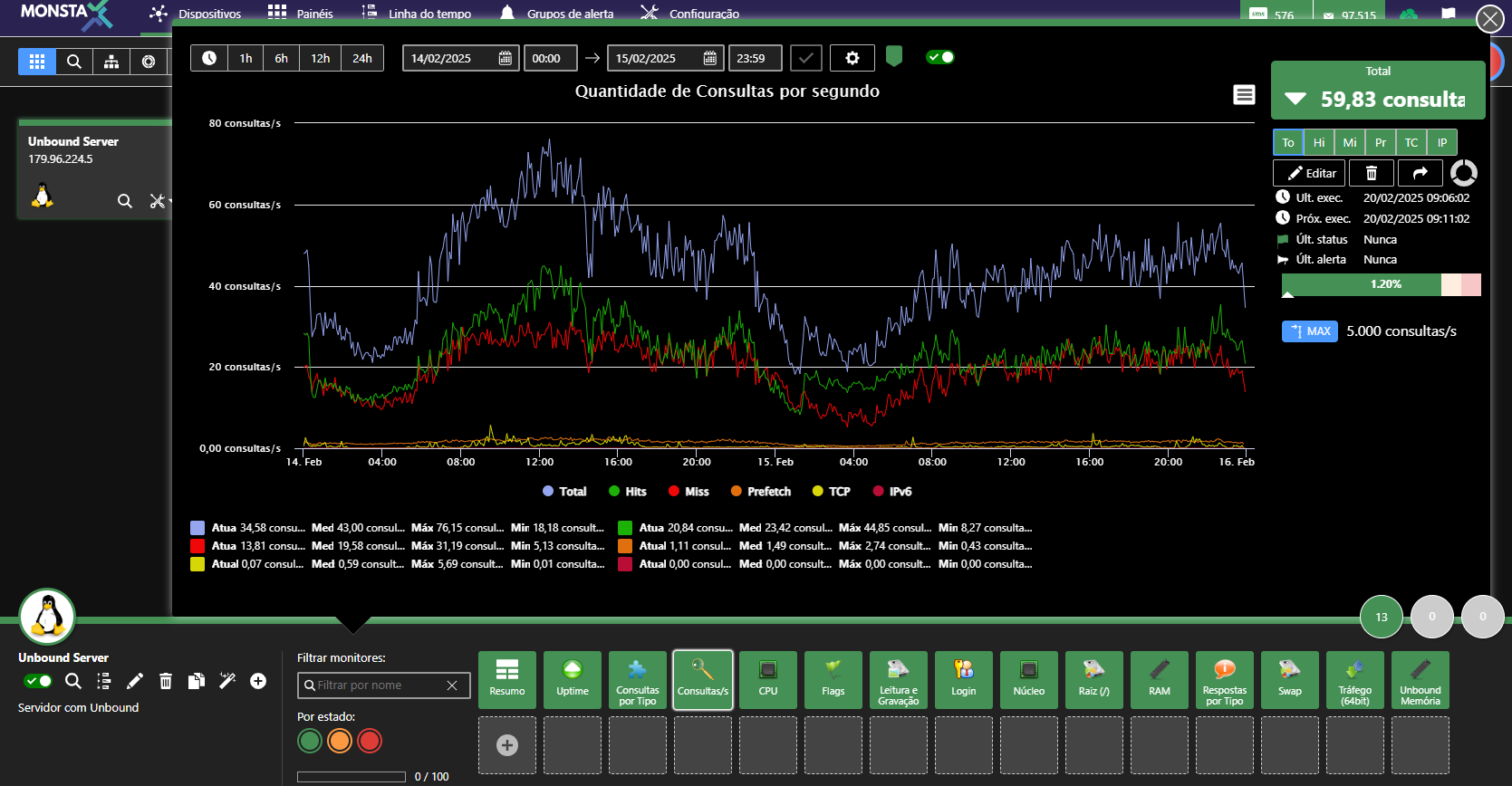
Tutorial para monitorar o servidor DNS Unbound através do serviço de SNMP.
[](https://wiki.monsta.com.br/uploads/images/gallery/2025-02/image-1740053252228.png)
#### Instalação do Unbound
Para instalar o servidor DNS Unbound e configurá-lo para iniciar automaticamente, digite os comandos abaixo:
```shell
yum install unbound
systemctl enable unbound
systemctl start unbound
```
#### Configuração do arquivo /etc/unbound/unbound.conf
Edite o arquivo /etc/unbound/unbound.conf e habilite a opção para gerar estatísticas conforme abaixo:
`extended-statistics: yes`
O exemplo a seguir mostra uma configuração básica do servidor DNS Unbound com a opção para exibição de estatísticas extendidas habilitada.
| server:
verbosity: 1
satistics-interval: 0
statistics-cumulative: no
extended-statistics: yes
num-threads: 2
interface: 0.0.0.0
interface-automatic: yes
outgoing-range: 5000
so-rcvbuf: 4m
so-sndbuf: 4m
msg-cache-size: 25m
msg-cache-slabs: 2
num-queries-per-thread: 2500
rrset-cache-size: 50m
rrset-cache-slabs: 2
infra-cache-slabs: 2
access-control: 0.0.0.0/0 allow
chroot: ""
username: "unbound"
directory: "/etc/unbound"
log-time-ascii: yes
pidfile: "/var/run/unbound/unbound.pid"
harden-glue: yes
harden-dnssec-stripped: yes
harden-below-nxdomain: yes
harden-referral-path: yes
use-caps-for-id: no
unwanted-reply-threshold: 10000000
prefetch: yes
prefetch-key: yes
rrset-roundrobin: yes
minimal-responses: yes
trusted-keys-file: /etc/unbound/keys.d/\*.key
auto-trust-anchor-file: "/var/lib/unbound/root.key"
val-clean-additional: yes
val-permissive-mode: no
val-log-level: 1
key-cache-slabs: 2
include: /etc/unbound/local.d/\*.conf
remote-control:
control-enable: yes
server-key-file: "/etc/unbound/unbound\_server.key"
server-cert-file: "/etc/unbound/unbound\_server.pem"
control-key-file: "/etc/unbound/unbound\_control.key"
control-cert-file: "/etc/unbound/unbound\_control.pem"
include: /etc/unbound/conf.d/\*.conf |
#### Reiniciando o serviço unbound
Após, reinicie o serviço com o comando:
```shell
systemctl restart unbound
```
#### Configurando o SNMP para enviar as estatísticas do Unbound
Caso seu sistema não tenha o servidor SNMP configurado, leia o tutorial “Configurando o SNMP” disponível no site do Monsta.
Faça um backup do arquivo /etc/snmpd.conf:
```shell
cp /etc/snmp/snmpd.conf /etc/snmp/snmpd.conf.backup
```
Edite o arquivo /etc/snmp/snmpd.conf e configure-o conforme exemplo abaixo. Se desejar, altere o nome da comunidade.
`rocommunity public`
`extend .1.3.6.1.3.1983.1.1 Unbound /usr/bin/cat /tmp/unbound_stats.txt`
#### Reiniciando e habilitando o serviço SNMP
Na tela de terminal, digite:
```shell
systemctl restart snmpd
```
#### Adicionando as estatísticas na cron
Na tela de terminal, digite o comando abaixo:
```shell
(crontab -l ; echo '*/1 * * * * /usr/sbin/unbound-control stats_noreset > /tmp/unbound_stats.txt' ) | crontab -
```
Após esses procedimentos, já é possível utilizar o Template “Unbound – DNS Server” para monitorar as estatísticas do seu servidor de DNS.
#### Extra
Em alguns sistemas o comando cat encontra-se em um diretório diferente do configurado no arquivo snmpd.conf. Para evitar problemas, você pode criar um link simbólico com o comando abaixo:
```shell
ln -s /usr/sbin/cat /bin
```
#### Teste das configurações
Para testar se as configurações feitas estão corretas, execute os passos abaixo:
```shell
yum install net-snmp-utils
snmpwalk -c public -v2c localhost .1.3.6.1.3.1983.1.1
```
O comando snmpwalk deverá retornar informações conforme o exemplo abaixo:
| SNMPv2-SMI::experimental.1983.1.1.1.0 = INTEGER: 1
SNMPv2-SMI::experimental.1983.1.1.2.1.2.7.85.110.98.111.117.110.100 = STRING: "/usr/bin/cat"
SNMPv2-SMI::experimental.1983.1.1.2.1.3.7.85.110.98.111.117.110.100 = STRING: "/tmp/unbound\_stats.txt"
SNMPv2-SMI::experimental.1983.1.1.2.1.4.7.85.110.98.111.117.110.100 = ""
SNMPv2-SMI::experimental.1983.1.1.2.1.5.7.85.110.98.111.117.110.100 = INTEGER: 5
SNMPv2-SMI::experimental.1983.1.1.2.1.6.7.85.110.98.111.117.110.100 = INTEGER: 1
SNMPv2-SMI::experimental.1983.1.1.2.1.7.7.85.110.98.111.117.110.100 = INTEGER: 1
SNMPv2-SMI::experimental.1983.1.1.2.1.20.7.85.110.98.111.117.110.100 = INTEGER: 4
SNMPv2-SMI::experimental.1983.1.1.2.1.21.7.85.110.98.111.117.110.100 = INTEGER: 1
.. |
- - - - - -
#### Contato
**Monsta Tecnologia Ltda**
Site: [http://www.monsta.com.br](http://www.monsta.com.br)
Downloads: [http://www.monsta.com.br/download.html](http://www.monsta.com.br/download.html)
E-mail:
- - - - - -
[](https://wiki.monsta.com.br/uploads/images/gallery/2022-02/image-1645214142023.png)